AI doesn't need more models. It needs better operations.
After solving the problem of running local models, I ran into a different challenge.
Keeping everything running.
My home lab isn't a single server anymore.
It consists of multiple Ubuntu machines, Raspberry Pis, Docker hosts, AI services, databases, reverse proxies, and production applications. Some run continuously for client projects, while others support my day-to-day software development.
When something fails, I don't want to discover it after a customer messages me.
I want the platform to tell me.
That's where the operational side of the home lab became just as important as the AI itself.
The Platform
Today, almost every service I run is containerized.
Instead of manually managing servers, I manage a platform.
That platform consists of four key components.
Portainer — The Control Plane
Every Docker host is connected to Portainer.
From a single interface I can:
- Deploy new stacks
- Update containers
- View logs
- Inspect volumes and networks
- Manage multiple machines
- Roll back deployments
Instead of remembering SSH commands for every host, I have a single operational dashboard.
As the number of servers increased, this became indispensable.
OmniRoute — One API for Every AI Model
One of the biggest frustrations with modern AI development is that every provider exposes a different endpoint, authentication method, and pricing model.
- OpenAI.
- Claude.
- Gemini.
- Local models.
- NVIDIA NIM.
They all work differently.
OmniRoute solves that problem.
Every development tool—Cursor, Cline, VS Code, Open WebUI, or my own applications—talks to a single OpenAI-compatible endpoint.
Behind the scenes, OmniRoute decides where requests should go.
That means I can:
- Switch providers without changing applications
- Route coding requests differently from reasoning requests
- Mix cloud and local models
- Introduce new providers without reconfiguring every client
Applications remain unchanged. Only the infrastructure evolves.
Beszel — Understanding Resource Usage
Running AI workloads means constantly asking questions like:
- Which machine is overloaded?
- How much GPU memory am I using?
- Is a model consuming excessive RAM?
- Which server should host the next service?
Beszel gives me those answers. Rather than logging into multiple machines, I have a lightweight view of CPU, memory, disk usage, network activity, and system health across the entire lab.
It's simple, fast, and exactly what I need for a home environment.
Uptime Kuma — The First Line of Defence
Monitoring infrastructure is useful.
Knowing when users can't reach your application is even more useful.
Every important service in my lab is monitored.
That includes:
- AI gateways
- APIs
- Reverse proxies
- Databases
- Internal dashboards
- Client applications
If something stops responding, I know immediately. Monitoring isn't just about graphs.
It's about confidence.
Everything Together
None of these tools is particularly complicated on its own.
The value comes from how they work together.
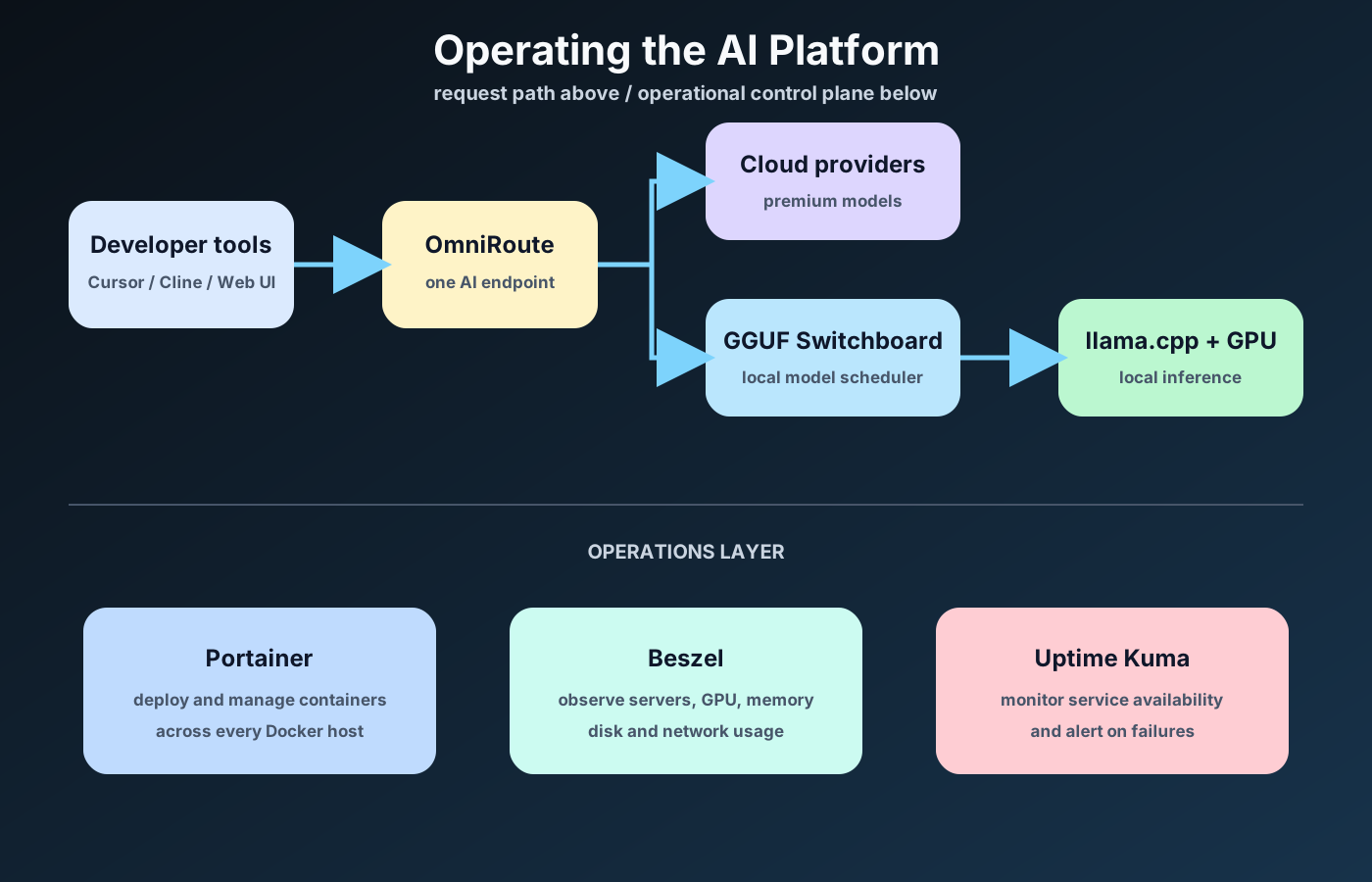
Each tool has a single responsibility.
None tries to solve every problem.
Together they create something much more valuable: an AI platform that I can actually depend on.
Lessons Learned
One of the biggest misconceptions about self-hosting AI is that the challenge is running language models.
It isn't.
The difficult part is operating the surrounding platform for
Reliable deployments.
Monitoring.
Updates.
Networking.
Backups.
Observability.
Those are the things that determine whether a home lab becomes a useful engineering platform or simply another collection of Docker containers.
Looking Ahead
The infrastructure is now capable of running AI workloads reliably.
The next challenge is giving local models useful, long-term project context without sending private code or documents to the cloud.
In Part 4, I'll explain how Local Project RAG gives my AI tools persistent memory across repositories while keeping that knowledge inside the home lab.
Building an AI Home Lab
- Part 1 — Why I Stopped Treating AI as a Cloud Service
- Part 2 — GGUF Switchboard: Bringing Kubernetes Thinking to Local LLMs
- Part 3 — Operating an AI Platform
- Part 4 — Local Project RAG: Giving AI the Context It Actually Needs
- Part 5 — The AI Platform I Use Every Day